
Our data says to leave it alone.
At Optmyzr, we compared advertisers who applied seasonality adjustments during Black Friday–Cyber Monday against those who let Smart Bidding handle the week on its own. The results were clear.
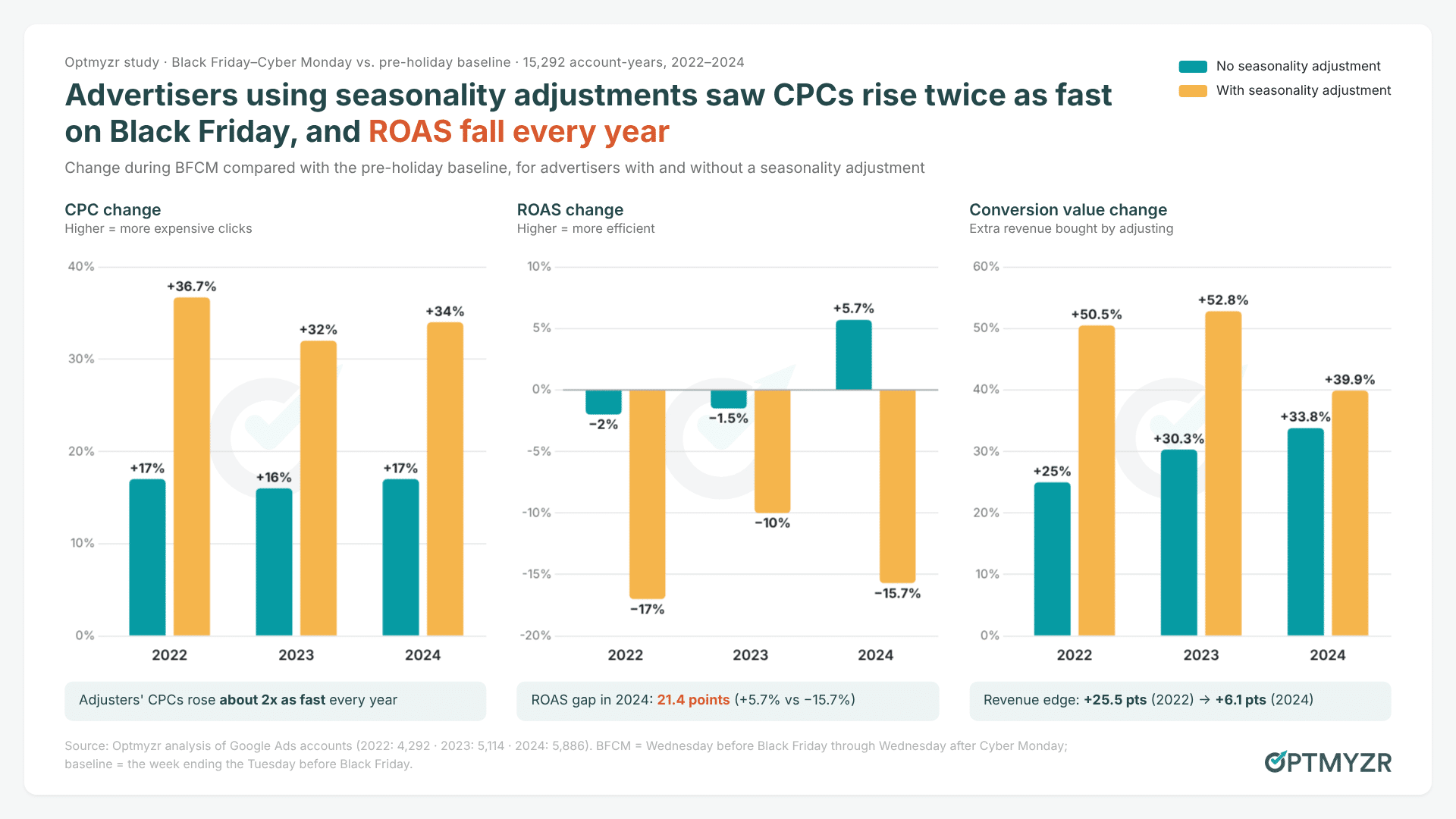
In 2024, across 5,886 accounts, the advertisers who used adjustments saw CPCs rise 34%, twice the 17% increase seen by those who didn’t. Their ROAS fell 15.7%. Advertisers who left Smart Bidding alone saw ROAS rise 5.7%.
We ran the same analysis for 2022 and 2023, and the pattern held each year.
We’ll examine our findings, why adjustments misfire on predictable events, and what to do instead. The short version: use guardrails, not overrides. I’ll also show how an AI assistant can help you set those guardrails in an afternoon rather than a week.
What three years of BFCM data shows
We measured each BFCM period from the Wednesday before Black Friday through the Wednesday after Cyber Monday. Then we compared it with a pre-holiday baseline (from two Tuesdays before Black Friday to the Tuesday before).
Advertisers were split into two groups: those who set seasonality adjustments for the period and those who didn’t. Together, the three years cover tens of billions of impressions.
Three things stand out:
- CPCs consistently rose about twice as fast with adjustments. Every year, telling Google to expect higher conversion rates translated directly into higher bids. Advertisers who didn’t intervene still paid more for Black Friday clicks, but their costs rose only half as much.
- The extra revenue is getting more expensive. Adjustments did buy volume. But the gap is closing. In 2022, advertisers using adjustments grew conversion value about 25 points more than everyone else. By 2024, the advantage had shrunk to about 6 points, and it cost them a ROAS swing of more than 21 points. That’s a lot of efficiency to give up for a small amount of extra revenue.
- The Black Friday conversion rate bump is shrinking. Among advertisers who didn’t use adjustments, conversion rates rose 17.5% over baseline in 2022, 11.9% in 2023, and just 7.5% in 2024. Shoppers now spread their purchases across a longer promotional season, flattening the peak compared with before. As a result, anyone who sets an adjustment based on what Black Friday “usually” does is likely overestimating the lift.
One caveat: we compared two groups of advertisers, which isn’t the same as a controlled experiment. Advertisers who use seasonality adjustments may also be more aggressive about volume in other ways. But three years of the same direction, at this scale, is a strong signal.
Why seasonality adjustments backfire on Black Friday
A seasonality adjustment tells Smart Bidding: “Conversion rates are about to rise by X%. Bid accordingly.” The system takes you at your word and raises bids in proportion.
That creates two problems on Black Friday:
- Google already knows Black Friday is coming. Smart Bidding is already trained on years of BFCM behavior across millions of advertisers. It also reacts to real-time auction signals as the week unfolds. Consequently, when you add an adjustment on top, you’re asking the system to anticipate a lift it’s already expecting. This leads to the expectation being counted twice.
- You have to predict the lift precisely, and almost nobody can. If you guess conversion rates will rise 20% and they rise 7.5%, as the average did in 2024, you’ve told Google to overbid by a wide margin. And it will do that across every auction at the year’s most expensive point, before you’ve had time to notice.
- Your own flash sale or surprise clearance event.
- A one-off “friends and family” promotion.
- A big email or SMS push to your customer list.
- A niche industry event with no broad historical pattern.
For Black Friday, Cyber Monday, Christmas, and other widely recognized holidays, the data says to leave the adjustment off.
If the business wants to trade some efficiency for more BFCM volume, there’s a more direct way to say so: change the target. Andrew Lolk makes this point when he talks about advertisers actively managing their ROAS targets rather than leaving them untouched year after year. Lowering a tROAS target clearly signals what you’re willing to pay for volume. A seasonality adjustment is a forecast, and on Black Friday it’s usually a bad one.
Guardrails instead of overrides
Letting Smart Bidding handle Black Friday still leaves you with plenty to do. Your effort shifts from predicting the week to protecting it: checking inputs before the sale and monitoring outputs during it.
This is where an AI assistant connected to your ad data earns its keep.
With Optmyzr’s MCP, an assistant like Claude or ChatGPT can read performance, change history, alerts, feed issues and GA4 data across every account you manage in Optmyzr, so you can start with the question instead of an export. Here are the checks I’d run, and the prompts I’d use.
1. Find out what’s already been changed, including adjustments
Microsoft’s Joe Dries recommends settling your BFCM strategy by late September so changes can stabilize before peak demand. By October, you’re already in that window. So start by checking what has changed recently and what’s still scheduled.
New campaigns, restructures, and big target changes all force the bidding system to relearn. Make them right before Black Friday and you’re asking it to learn while traffic is at its most expensive. Seasonality adjustments are easy to miss, especially in agencies where a client or teammate may have set one up “just in case.”
Try it in Optmyzr: “Across all my retail accounts, list any seasonality adjustments scheduled between November 20 and December 3, and every campaign where bid strategy, target, or budget changed in the last 21 days.”

Finding the changes is retrieval. Deciding whether they’re ready for Black Friday is still your call.
2. Give the assistant the business context, then test it on last year
Account data becomes useful once the assistant understands your business goals. Mike Rhodes says that without grounding, AI relies on generic “planet average” knowledge. Define your sale dates, promoted products, target changes, and historical patterns. This context transforms the data.
Optmyzr keeps a stored profile for each account (business model, objectives, structure, budget posture, and recent changes) that the assistant reads before it gives advice. You add the BFCM-specific details on top.
Then check whether it’s reading the account correctly. Julie Bacchini suggests asking AI questions you already know the answers to. Last year’s Black Friday is ideal:
Try it in Optmyzr: “Compare this account’s performance during BFCM 2025 with the two weeks before. What drove the biggest swings in ROAS and conversion value, and which campaigns mattered most?”

If its version of last year doesn’t match what you lived through, don’t trust it for this year yet.
3. Make sure the conversion signal is clean
If you’re going to let Smart Bidding drive Black Friday, it needs an accurate signal.
It is common to find accounts where several primary conversion actions report the same purchase, ending up double- or triple-counting the results.
This is critical when avoiding adjustments. Double-counted purchases trick Smart Bidding into overbidding based on inflated value — mimicking the very problem adjustments cause.
Keep the strongest direct purchase source as primary, use GA4 as a secondary point of comparison, make sure the settings match, and look for discrepancies.

4. Put budget where more budget still works
Budget requests flood in every November, but the real question is whether the next dollar buys incremental value. Scott Desgrosseilliers notes that campaigns eventually hit a saturation point:
“There’s just no more people in there that are willing to buy. Dial it down to the dollar amount per day that makes your profit.”
— Scott Desgrosseilliers, CEO, Wicked Reports
Black Friday makes that ceiling harder to see, because demand really does expand. Timing matters too. Across 5,134 ecommerce accounts we looked at in Optmyzr, Black Friday 2025 generated 34% more conversion value than Cyber Monday ($144.8M vs. $107.9M), at a higher ROAS (835% vs. 674%). Budget held back for Monday may arrive after the best day has passed.
The best candidates for more budget are campaigns that capped out last year while still producing results you’d have happily paid for.
Try it in Optmyzr: “Which campaigns lost impression share to budget during last year’s Black Friday weekend, and what were ROAS and conversion value doing when they hit the cap?”

5. Separate products when their economics are different
That control matters on Black Friday. A product discounted 40% doesn’t have the same economics as one discounted 10%. A category with six weeks of inventory doesn’t need the same treatment as one likely to sell out by Saturday afternoon. Segmenting gives you separate budgets, ROAS targets, and somewhere to shift spend if a category runs out of stock.
Try it in Optmyzr: “For my promoted product groups, show which gained the most spend in the last 14 days, which are losing efficiency, and which have merchant feed or inventory issues right now.”

Deciding which products deserve the money stays with you. The assistant’s job is to get all of those facts onto one page, quickly.
6. Set the alerts before the sale, not during it
Our study highlights a key guardrail: instead of predicting the week, define what failure looks like and automate the alerts:
- CPC anomaly alerts that fire when costs rise faster than you’ve planned for
- Budget pacing monitors at the account and portfolio level, so you see overspend in hours rather than days
- Bid caps and rules in Optmyzr’s Rule Engine for campaigns where you need a hard limit
You can create these from the same conversation:
Try it in Optmyzr: “Create an alert for each of my retail accounts that notifies me if daily spend is running more than 20% ahead of pace, or if CPC rises more than 30% versus the previous seven days.”
Then, once the sale starts, begin each morning at the portfolio level instead of opening accounts one by one:
Try it in Optmyzr: “Show me every BFCM alert that fired overnight. For each account, pull campaign performance and any changes made in the last 48 hours, and rank what needs attention first.”

7. Let the assistant distill the data, and keep the conclusions for yourself
Faster access to data becomes dangerous when you also hand over the judgment. Andrew Lolk described a case where an AI correctly saw ROAS rising and volume falling, then concluded the strategy was working. The goal was growth, so it was wrong:
“Do not conclude, do not infer, do not guess. The whole purpose is to expand. This is the opposite of what we want.”
— Andrew Lolk, Founder, Savvy Revenue
Ask the assistant which campaigns account for most of the ROAS movement, and whether CPC, conversion rate, or average order value changed. Then decide yourself whether any of it calls for action.
Keep people on both ends of every change
Ann Stanley calls this the “human AI sandwich.” In this model, experienced people frame the problem, AI handles the work in the middle, and then another experienced person evaluates the output before anything goes live.
For Black Friday, that means writing the rules before you’re under pressure. Which campaigns can never be changed automatically? How far ahead of pace does spend have to get before someone looks? How much data is enough before a target gets touched? Which changes always need approval?
In Optmyzr, you can turn those answers into policies. Your organization’s policies set limits on what can change and by how much, and the assistant works inside them. When it proposes a change (a budget shift, a target edit, a paused product group), the change goes into a review queue. You see exactly what will go live, along with any policy warnings, and nothing reaches the account until someone with the right permissions approves it.
Why Optmyzr for BFCM
- Portfolio-wide questions. Ask across every account and platform you manage in Optmyzr, including Google, Microsoft, Meta, LinkedIn, and TikTok, instead of opening them one by one.
- Context the raw API doesn’t have. Each account’s stored business profile, Optmyzr’s prioritized optimization opportunities, merchant feed problems, and benchmarks against your vertical.
- Guardrails you can set from the conversation. Create performance and pacing alerts in plain language, then check what fired each morning.
- Changes with a human in the loop. Every write goes through your organization’s policies and an approval workflow.
Data shows Smart Bidding handles Black Friday better without seasonality adjustments. However, you still need rapid visibility to act when performance shifts.
Before Thanksgiving, run the checks above on your own accounts. Start a free Optmyzr trial and connect your assistant to the Optmyzr MCP. From there, you can use our BFCM prompt library to audit your changes, conversion tracking, budgets, and alerts all in one sitting. The full three-year study is here.
Fonte ==> Istoé